Orofera® 1200Mbps WiFi Extender – Eliminate WiFi Dead Zones
Orofera® 1200Mbps WiFi Extender – Eliminate WiFi Dead Zones
BOOST YOUR WIFI COVERAGE
Couldn't load pickup availability
Extend. Connect. Enjoy.
Bring Stronger WiFi to More of Your Home
This 1200Mbps dual-band WiFi range extender helps carry your router's existing signal into rooms where coverage feels weak—so more of your everyday devices can stay connected.

Weak-Signal Rooms Need a Better Link
Keep Your Connection Moving Beyond the Router
Distance, interior walls and room layout can weaken a router's signal. Place the extender within reliable router range to help carry coverage toward bedrooms, home offices and entertainment spaces.

Made for Everyday Connected Living
A More Reliable Link for Work, Play and Streaming
Extend the network you already use and help reduce the frustration of weak coverage in the places where your connected life happens.
Smoother Gaming
Help maintain a steadier connection in weak-signal gaming areas.
Broader Coverage
Carry your router's signal farther into nearby rooms and spaces.
Clearer Video Calls
Support more consistent online meetings from your home workspace.
Clean Plug-In Design
Mounts directly at the outlet with no long cable across the room.

One Extender. Three Simple Jobs.
Receive, Extend and Reconnect
The extender works between your router and a weak-signal area, relaying the existing WiFi connection so compatible devices can connect farther away.
Receive
It picks up the wireless signal from your existing router.
Extend
It relays the connection toward an area with weaker coverage.
Connect
Your phones, computers and other devices join the extended network.
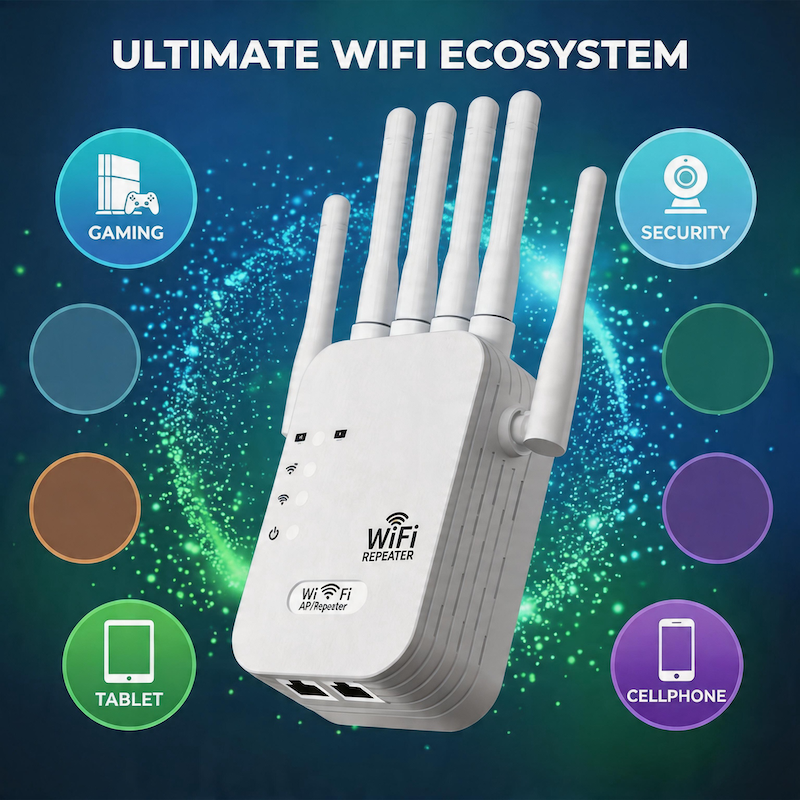
Built Around Your WiFi Ecosystem
Keep More of Your Everyday Devices Within Reach
Extend access for the connected devices you use throughout the day, from entertainment and work equipment to smart-home essentials.

Plug In. Set Up. Reposition.
Get Connected in a Few Guided Steps
Plug In Near the Router
Start close to your router so the extender receives a stable signal.
Follow the Setup Guide
Use the included instructions to connect it to your home WiFi network.
Move to the Best Outlet
Reposition it between the router and your weak-coverage area.
Placement Makes the Difference
A range extender cannot relay a signal it cannot receive. Avoid placing it inside the final dead zone. For a stronger link, choose an open outlet with a reliable connection to the main router and keep large metal objects or heavy electrical interference away when possible.
Capacity for a Busy Connected Home
Dual-band operation gives compatible devices more flexibility when connecting for browsing, streaming, video calls and everyday online use.
1200Mbps is the advertised combined wireless rate. Actual throughput, range and device performance vary with the router, internet plan, distance, walls, interference, device capability and placement.
Try It Risk-Free for 180 Days
Give the WiFi extender time to prove itself in your home. If you are not satisfied with your purchase, contact our customer support team within 180 days of delivery to request a refund under our 180-day money-back guarantee.
Refund eligibility, item-condition requirements, exclusions, return shipping costs and refund processing are governed by the store's official return and refund policy. Contact support before returning an item.
Questions Before You Connect?
Frequently Asked Questions
What does a WiFi range extender do?
It receives your router's existing wireless signal and relays it toward nearby areas where coverage is weaker. It does not replace your router or create a separate internet service.
Where should I place the extender?
Place it between the router and the weak-coverage area, while staying close enough to receive a stable signal from the main router. Avoid installing it at the far end of a complete dead zone.
Will it make my internet plan faster?
No. An extender can improve access to your existing connection in weak areas, but it cannot increase the speed supplied by your internet provider.
Can I connect more than one type of device?
It is designed for common WiFi-enabled devices such as phones, tablets, laptops, smart TVs, cameras, game consoles and speakers. Compatibility can vary by device and network configuration.
Does 1200Mbps mean every device will reach that speed?
No. The advertised figure is the combined wireless rate across the supported bands. Real-world speed depends on your internet plan, router, device, distance, walls, interference and extender placement.
What should I do if the extended signal is still weak?
Move the extender closer to the router, reduce nearby interference and confirm that the main router itself has a stable connection. Then repeat the placement test before moving it farther away.
How does the 180-day money-back guarantee work?
Contact customer support within 180 days of delivery to request a refund. Eligibility, product-condition requirements, exclusions, return shipping and refund processing are subject to the store's official return and refund policy.
Make More of Your Home Feel Connected
Extend the WiFi You Already Use
Dual-band performance, a multi-antenna design and simple outlet placement help bring your existing network closer to the rooms and devices that need it.